Stream videos with Go and Http
Introduction
In this article, we’ll explore different approaches for streaming video over the internet and demonstrate a simple, practical example of building a video streaming server using Go. The example will show how to serve video content efficiently with HTTP range requests, allowing playback directly in the browser through the HTML5 <video> tag.
Video Streaming
When it comes to streaming videos online, there are three main approaches developers can take:
- HTTP-based streaming:
This is the most straightforward and browser-friendly option. The video is served over standard HTTP and played using the browser’s built-in <video> tag. Modern browsers natively support this, which makes it perfect for serving video files directly from your Go server without extra dependencies or complex client-side logic.
- Streaming via WebSocket:
Using WebSockets allows real-time, bidirectional data transfer between the client and server. However, the <video> element doesn’t natively support WebSockets. To make this work, you’d need to manually decode and render frames (for example, on a <canvas> element) and handle audio separately — a process that can quickly become complicated and is rarely worth the effort unless you’re building something highly custom, like a live data visualization or a remote desktop app.
- Streaming via WebRTC:
WebRTC is a peer-to-peer communication protocol designed for real-time audio and video streaming between clients. Its main advantage is that once the connection is established, the media can flow directly between users without routing all the data through your server. However, establishing a WebRTC connection typically requires a signaling mechanism (such as WebSockets), and setup can be more involved than standard HTTP streaming.
In this article, we’ll focus on streaming video using the HTTP protocol; because it’s simple, efficient, and requires minimal setup. The browser takes care of most of the heavy lifting, while your Go server only needs to handle HTTP range requests to support seeking and smooth playback. The server-side code is also lightweight and easy to understand, making it a great starting point for learning how video streaming works behind the scenes.
Streaming video over HTTP
Lets start by creating our project and setup the file structure
mkdir govideostream
cd govideostream
go mod init github.com/<YOUR USER NAME>/govideostream
touch main.go index.html
Let's start with the frontend part, which is going to be just a <video>tag, in the index.html file copy and paste the following code:
<!DOCTYPE html>
<html>
    <head>
        <title>Go video streaming</title>
    </head>
    <body>
        <video width="1200" controls muted="muted">
            <source src="http://localhost:8000/video" type="video/mp4" />
        </video>
    </body>
</html>
On the frontend, all we need to do is define the path to our video file or stream and specify its format. In our example, the browser will load the video from the /video endpoint as video/mp4.
You can also include multiple <source> tags inside the <video> element to provide different file formats or encodings this helps ensure compatibility across various browsers and devices.
Additionally, the <video> tag supports several optional attributes to control the user experience. You can show or hide playback controls, set the video width, start playback muted, or even make it autoplay when the page loads.
Once the <video> element is configured, the frontend part is complete; the browser takes care of fetching and playing the video stream automatically.
Streaming video with Go
Modern browsers use a simple but powerful mechanism to handle video playback efficiently. Instead of downloading the entire file at once, they can request specific parts of the video stream as needed.
When the browser fetches data for the <video> element, it includes an HTTP header called Range. This header specifies the exact byte range it wants for example:
Range: bytes=1024000-2048000This tells the server to send only that specific portion of the file. The browser will automatically request additional chunks as playback progresses or when the user seeks to another part of the video.
To make this work, the server’s response must include a few important headers Content-Length the size (in bytes) of the chunk being sent in this response. Content-Range indicates which part of the file this chunk represents and the total file size. Content-Type specifies the video format (e.g., video/mp4). Accept-Ranges tells the browser that the server supports partial content requests using byte ranges.
Together, these headers enable smooth streaming, allowing users to start watching immediately, seek freely, and load only what’s necessary instead of the entire video file.
The implementation code is fairly simple once we know what to do:
package main

import (
	"fmt"
	"html/template"
	"io"
	"log"
	"net/http"
	"os"
	"path/filepath"
	"strconv"
	"strings"
)

const (
	chunkSize = 1024 * 1024 // 1MB
	videoPath = "video.mp4"
)

var (
	tpl *template.Template
)

func main() {
	// Parse the template once at startup
	var err error
	tpl, err = template.ParseFiles(filepath.Join("index.html"))
	if err != nil {
		log.Fatalf("parse template: %v", err)
	}

	http.HandleFunc("/", rootHandler)
	http.HandleFunc("/video", videoHandler)

	log.Println("listening on http://localhost:8000")
	if err := http.ListenAndServe(":8000", nil); err != nil {
		log.Fatal(err)
	}
}

func rootHandler(w http.ResponseWriter, r *http.Request) {
	w.Header().Set("Content-Type", "text/html; charset=utf-8")
	if err := tpl.Execute(w, map[string]any{
		"Request": r, // roughly analogous to passing {"request": request} in FastAPI/Jinja2
	}); err != nil {
		http.Error(w, "template error", http.StatusInternalServerError)
	}
}

func videoHandler(w http.ResponseWriter, r *http.Request) {
	file, err := os.Open(videoPath)
	if err != nil {
		http.Error(w, "video not found", http.StatusNotFound)
		return
	}
	defer file.Close()

	stat, err := file.Stat()
	if err != nil {
		http.Error(w, "cannot stat file", http.StatusInternalServerError)
		return
	}
	size := stat.Size()

	w.Header().Set("Accept-Ranges", "bytes")
	w.Header().Set("Content-Type", "video/mp4")

	rangeHdr := r.Header.Get("Range")
	if rangeHdr == "" {
		// No Range header: serve the whole file (200 OK)
		w.Header().Set("Content-Length", strconv.FormatInt(size, 10))
		if _, err := io.Copy(w, file); err != nil {
			log.Printf("copy full file: %v", err)
		}
		return
	}

	// Expect formats like: "bytes=START-" or "bytes=START-END"
	if !strings.HasPrefix(strings.ToLower(rangeHdr), "bytes=") {
		http.Error(w, "invalid range", http.StatusRequestedRangeNotSatisfiable)
		return
	}
	rangeSpec := strings.TrimPrefix(rangeHdr, "bytes=")
	parts := strings.Split(rangeSpec, "-")
	if len(parts) != 2 || parts[0] == "" {
		http.Error(w, "invalid range", http.StatusRequestedRangeNotSatisfiable)
		return
	}

	start, err := strconv.ParseInt(parts[0], 10, 64)
	if err != nil || start < 0 {
		http.Error(w, "invalid range start", http.StatusRequestedRangeNotSatisfiable)
		return
	}

	// Compute end (inclusive)
	var end int64
	if parts[1] == "" {
		// No end provided: mimic the Python version's behavior (chunked)
		end = start + chunkSize - 1
	} else {
		end, err = strconv.ParseInt(parts[1], 10, 64)
		if err != nil || end < start {
			http.Error(w, "invalid range end", http.StatusRequestedRangeNotSatisfiable)
			return
		}
	}

	// Clamp to file size - 1
	if start >= size {
		// Invalid range: start beyond EOF
		w.Header().Set("Content-Range", fmt.Sprintf("bytes */%d", size))
		http.Error(w, "range not satisfiable", http.StatusRequestedRangeNotSatisfiable)
		return
	}
	if end >= size {
		end = size - 1
	}

	length := end - start + 1

	// Prepare headers for 206 Partial Content
	w.Header().Set("Content-Range", fmt.Sprintf("bytes %d-%d/%d", start, end, size))
	w.Header().Set("Content-Length", strconv.FormatInt(length, 10))
	w.WriteHeader(http.StatusPartialContent)

	// Seek and write exactly the requested bytes
	if _, err := file.Seek(start, io.SeekStart); err != nil {
		log.Printf("seek error: %v", err)
		return
	}
	if _, err := io.CopyN(w, file, length); err != nil {
		// Client may cancel early; just log
		log.Printf("copyN error: %v", err)
	}
}
In our Go server, we define two routes:
- The / route serves the HTML template that contains the
<video>tag. - The /video route handles the actual video streaming logic.
When the browser requests the /video endpoint, it usually includes an HTTP Range header, something like Range: bytes=0-. This tells the server that the browser wants only a portion of the video file rather than the entire thing. The portion being requested is called a chunk.
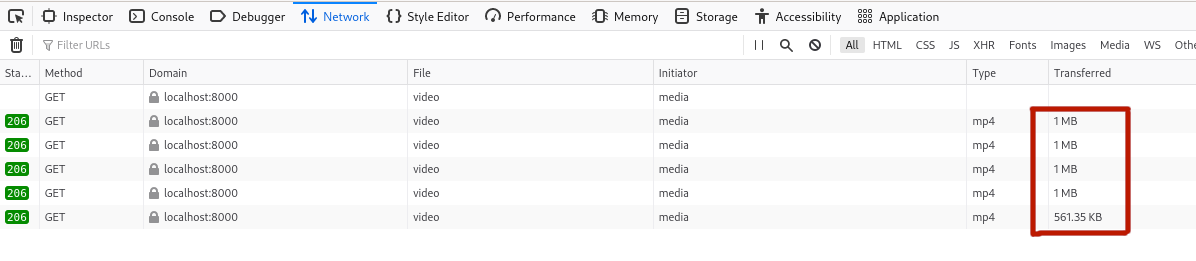
In our implementation, we use a default chunk size of 1 MB. If the browser’s request doesn’t specify an end range, we simply calculate it based on that chunk size. This ensures that the video is streamed in manageable segments instead of loading the entire file at once.
Once we know the range to send, the server:
- Opens the video file using Go’s standard
os.Open()function. - Moves the file pointer to the correct starting byte using
file.Seek(start, io.SeekStart). - Reads the requested portion with
io.CopyN(w, file, length); this efficiently copies only the required bytes directly to the response.
After preparing the data, the server constructs a partial content response with the status code 206, indicating that the response contains only part of the file. It also includes the necessary headers:
- Content-Range — shows which bytes are being sent and the total file size.
- Content-Length — specifies the size of the current chunk.
- Content-Type — tells the browser the video format (video/mp4).
- Accept-Ranges — signals that the server supports byte-range requests.
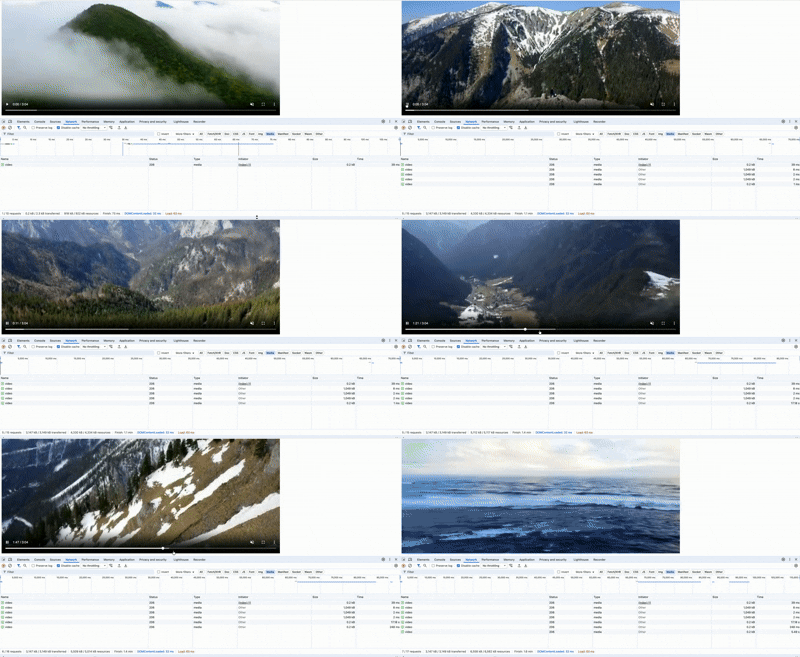
When you run the server and open the page in your browser, the video will start playing immediately. Behind the scenes, the browser automatically requests additional 1 MB chunks as needed — allowing smooth playback and seamless seeking, just like on professional streaming platforms.
Result
Github
Conclusion
In this tutorial, we built a simple yet powerful video streaming server in Go that leverages HTTP range requests to deliver smooth, efficient playback in any modern browser.
We learned how browsers request partial video data through the Range header, how to respond with proper Content-Range and 206 Partial Content status, and how the <video> tag can automatically handle chunked playback without any complex frontend logic.
While this example focused on basic local file streaming, the same principles apply to more advanced setups including authenticated streams, adaptive bitrate delivery, and even live broadcasting. Go’s strong concurrency model and efficient I/O make it an excellent choice for building fast, scalable streaming backends.
If you’re looking to expand on this foundation, consider exploring; Integrating HLS or DASH for adaptive streaming.
With just a few lines of Go code, you’ve built the foundation of a real-world streaming system; simple, robust, and ready to evolve