Real Time Chat System With Golang, Redis and Server Side Events
Introduction
Server-Sent Events (SSE) is a lightweight and efficient technology that enables servers to push real-time updates to connected clients over a single, long-lived HTTP connection. Unlike traditional polling or the more complex WebSocket protocol, SSE provides a simple, unidirectional communication channel—perfect for applications that only require server-to-client data flow.
In this article, we’ll dive into how to implement SSE in Go, exploring its core concepts, advantages, and practical use cases. You’ll also see hands-on examples demonstrating how to stream live updates directly to a browser using Go’s standard library.
By the end of this guide, you’ll have a solid understanding of how to use SSE for building real-time applications—from live dashboards and notifications to chat systems—using clean, efficient, and idiomatic Go code.
What is Server Side Events
Server-Sent Events (SSE) is a modern web technology that enables servers to push real-time data to clients through a single, persistent HTTP connection.
Unlike WebSockets, which offer full-duplex (two-way) communication, SSE provides a unidirectional stream — from the server to the client. This design makes it significantly simpler to implement and perfectly suited for scenarios where continuous updates are needed from the server, but the client doesn’t need to send data back through the same channel.
Building an SSE-powered web application is both intuitive and lightweight. On the server side, you only need a small amount of code to continuously stream events. On the client side, handling incoming data is nearly identical to using WebSockets — you register event listeners and react to updates as they arrive. However, because the connection is one-way, clients cannot send messages back to the server using SSE.
Benefits of Server-Sent Events
- Simplicity: SSE is easier to set up and maintain compared to WebSockets, requiring less code and configuration.
- Native Browser Support: Most modern browsers support SSE natively through the EventSource API — no external libraries required.
- Automatic Reconnection: If the connection drops (for example, due to network issues), the client will automatically attempt to reconnect without additional logic.
- Efficiency: SSE operates over a single HTTP connection, minimizing overhead and making it ideal for scalable real-time applications such as dashboards, notifications, or live data feeds.
How to Implement SSE in Go
For this example, we’ll build a simple Server-Sent Events (SSE) server in Go that continuously sends updates to connected clients. Specifically, the server will stream the current timestamp every second, giving us a real-time feed of data updates.
Once running, any client can connect to our server on port 8080 and begin receiving live messages as they are sent. This basic setup demonstrates the power and simplicity of SSE data flows automatically to clients as soon as it’s available, without the need for repeated polling or manual refreshes.
In a real-world application, this same architecture can be extended far beyond timestamps. You might use SSE to:
- Send live notifications to users when new events occur.
- Display progress bar updates for long-running tasks.
- Push system health or analytics metrics to a live dashboard.
- Stream logs or sensor readings in real time.
This example serves as a foundation — showing how easy it is to build continuous, one-way data streams from your Go backend to your users’ browsers using nothing more than standard HTTP and the Go standard library.
mkdir ssegoredis && cd ssegoredis
go mod init github.com/<YOUR USERNAME>/ssegoredis
// go: creating new go.mod: module github.com/<YOUR USERNAME>/ssegoredis

touch main.go example.html
// main.go
package main
import (
"fmt"
"log"
"net/http"
"time"
)
func eventsHandler(w http.ResponseWriter, r *http.Request) {
// Required SSE headers
w.Header().Set("Content-Type", "text/event-stream")
w.Header().Set("Cache-Control", "no-cache")
w.Header().Set("Connection", "keep-alive")
// Optional: allow cross-origin EventSource connections (tune for your app)
w.Header().Set("Access-Control-Allow-Origin", "*")
// Ensure the ResponseWriter supports flushing
clientGone := r.Context().Done()
rc := http.NewResponseController(w)
t := time.NewTicker(time.Second)
defer t.Stop()
for {
select {
case <-clientGone:
fmt.Println("Client disconnected")
return
case <-t.C:
// Send an event to the client
// Here we send only the "data" field, but there are few others
_, err := fmt.Fprintf(w, "data: The time is %s\n\n", time.Now().Format(time.UnixDate))
if err != nil {
return
}
err = rc.Flush()
if err != nil {
return
}
}
}
}
func main() {
http.HandleFunc("/events", eventsHandler)
addr := ":8080"
log.Printf("SSE server listening on %s …", addr)
if err := http.ListenAndServe(addr, nil); err != nil {
log.Fatal(err)
}
}In the exmplae.html file
<!doctype html>
<html>
    <body>
        <ul id="list"></ul>
    </body>

    <script type="text/javascript">
        console.log("Coucou");

        const eventSrc = new EventSource("http://127.0.0.1:8080/events");

        const list = document.getElementById("list");

        eventSrc.onmessage = (event) => {
            const li = document.createElement("li");
            li.textContent = `message: ${event.data}`;

            list.appendChild(li);
        };
    </script>
</html>
Run the Code and open the html file with your browser
go run main.go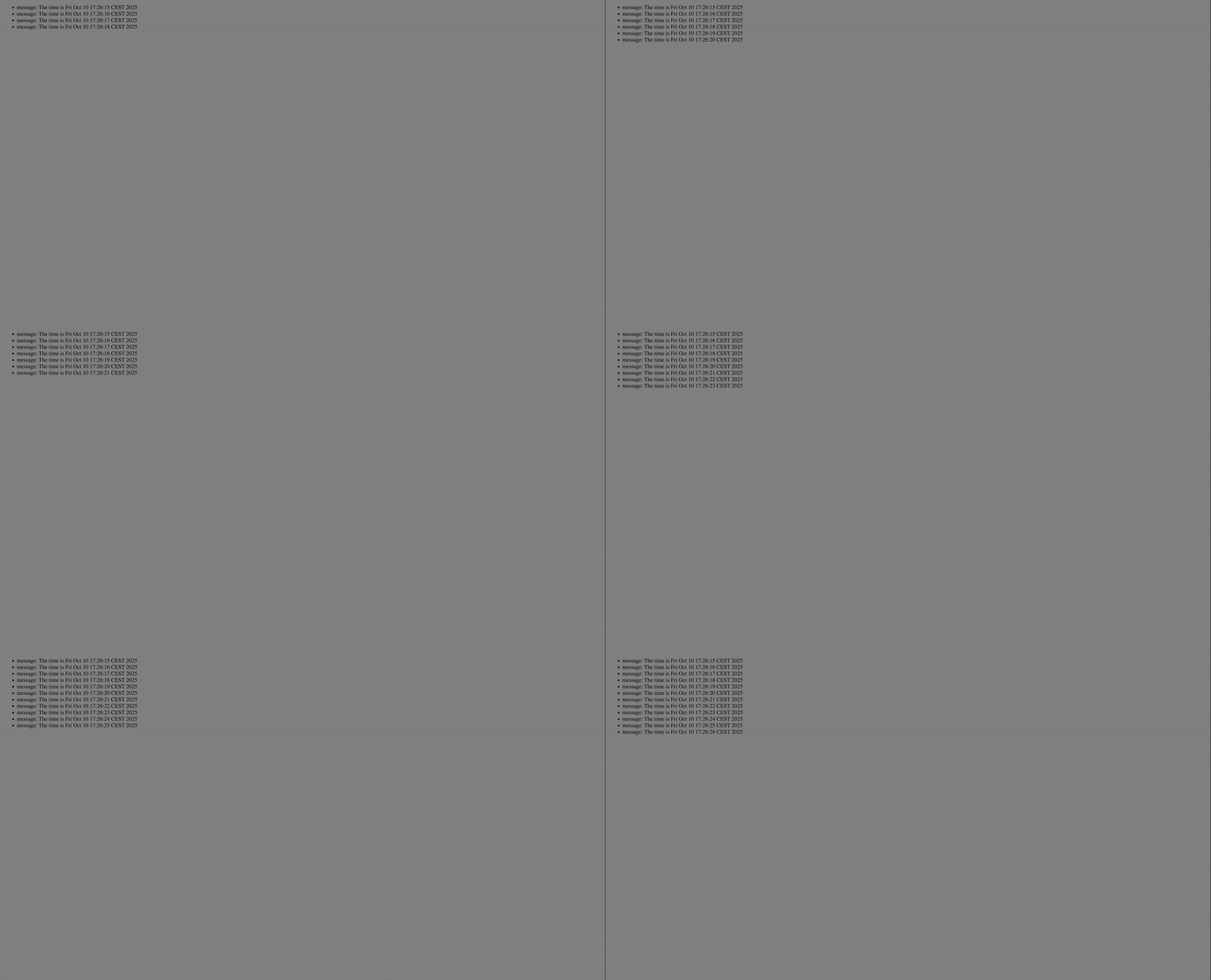
Real-World Implementation: Building a Chat System with Go and Server-Sent Events
To demonstrate how Server-Sent Events (SSE) can be used in practice, let’s walk through building a lightweight real-time chat system in Go. This implementation uses only Go’s standard library along with a minimal Redis client to handle message distribution. The idea is simple but powerful: clients send messages via a standard HTTP POST endpoint, the server publishes them to a Redis channel, and connected clients receive live updates through an SSE stream. This setup allows you to achieve real-time, one-way message delivery from server to client—without the complexity of WebSockets. In the following sections, we’ll explore the architecture, challenges, and complete Go code for this system, including the message publisher, Redis subscriber, and SSE event handler, along with client-side integration, error handling, and scaling considerations.
mkdir gossechat && cd gossechat
go mod init github.com/<YOUR USERNAME>/gossechat
go get github.com/go-redis/redis/v8
touch main.go index.html
package main
import (
"context"
"fmt"
"log"
"net/http"
"sync"
"github.com/go-redis/redis/v8"
)
var (
redisAddr = "localhost:6379"
redisChan = "chat" // the channel name
)
type sseClient struct {
// A channel where we send data to this client
send chan string
// You could add fields: lastEventID, done channel, etc.
}
type server struct {
redisClient *redis.Client
// protect clients map
mu sync.Mutex
clients map[*sseClient]struct{}
}
func newServer() *server {
rdb := redis.NewClient(&redis.Options{
Addr: redisAddr,
})
return &server{
redisClient: rdb,
clients: make(map[*sseClient]struct{}),
}
}
// handlePublish handles POST /send
// expects a form value "msg" or JSON etc.
func (s *server) handlePublish(w http.ResponseWriter, r *http.Request) {
w.Header().Set("Access-Control-Allow-Origin", "*")
ctx := r.Context()
msg := r.FormValue("msg")
if msg == "" {
http.Error(w, "msg missing", http.StatusBadRequest)
return
}
// publish to redis
err := s.redisClient.Publish(ctx, redisChan, msg).Err()
if err != nil {
log.Printf("Publish error: %v", err)
http.Error(w, "publish failed", http.StatusInternalServerError)
return
}
w.WriteHeader(http.StatusOK)
w.Write([]byte("ok"))
}
// handleEvents handles GET /events
// sets up an SSE connection to the client
func (s *server) handleEvents(w http.ResponseWriter, r *http.Request) {
// Prepare headers for SSE
w.Header().Set("Content-Type", "text/event-stream")
w.Header().Set("Cache-Control", "no-cache")
w.Header().Set("Connection", "keep-alive")
// Optionally:
w.Header().Set("Access-Control-Allow-Origin", "*")
flusher, ok := w.(http.Flusher)
if !ok {
http.Error(w, "Streaming unsupported", http.StatusInternalServerError)
return
}
// Create new SSE client
client := &sseClient{
send: make(chan string, 10), // buffered channel
}
// Register client
s.mu.Lock()
s.clients[client] = struct{}{}
s.mu.Unlock()
// When this handler exits, unregister the client
defer func() {
s.mu.Lock()
delete(s.clients, client)
s.mu.Unlock()
}()
// Notify the client that connection is established (optional)
// Send a comment or "connected" message
fmt.Fprintf(w, ": connected\n\n")
flusher.Flush()
// A simple loop: listen to client.send chan and write SSE messages
notify := r.Context().Done()
for {
select {
case <-notify:
// client closed connection
return
case msg := <-client.send:
// Send as an SSE “data:” message
// You can optionally add event: or id: lines
fmt.Fprintf(w, "data: %s\n\n", msg)
flusher.Flush()
}
}
}
// broadcastLoop subscribes to Redis and fans out messages to all SSE clients
func (s *server) broadcastLoop(ctx context.Context) {
pubsub := s.redisClient.Subscribe(ctx, redisChan)
// Ensure resources cleaned up when done
defer pubsub.Close()
ch := pubsub.Channel()
log.Printf("Subscribed to Redis channel %s", redisChan)
for {
select {
case <-ctx.Done():
return
case m, ok := <-ch:
if !ok {
log.Printf("Redis channel closed")
return
}
// Broadcast to all SSE clients
s.mu.Lock()
for c := range s.clients {
select {
case c.send <- m.Payload:
default:
// if the buffer is full, drop message for that client (or handle backpressure)
}
}
s.mu.Unlock()
}
}
}
func (s *server) routes() {
http.HandleFunc("/send", s.handlePublish)
http.HandleFunc("/events", s.handleEvents)
// optionally serve HTML page etc.
}
func main() {
srv := newServer()
srv.routes()
ctx, cancel := context.WithCancel(context.Background())
defer cancel()
go srv.broadcastLoop(ctx)
addr := ":8080"
log.Printf("Server listening on %s …", addr)
if err := http.ListenAndServe(addr, nil); err != nil {
log.Fatalf("ListenAndServe: %v", err)
}
}
Component Walkthrough & Explanation
We use go-redis/redis/v8 (or whichever Redis client you prefer). The key operations:
rdb.Publish(ctx, channel, message)to emit a messagerdb.Subscribe(ctx, channel)to create a subscription- Using
pubsub.Channel()returns a Go channelchan *redis.Messagefrom which you receive messages continuously.
In broadcastLoop, we listen on that channel forever, and when a message arrives, we fan out to SSE clients.
One nuance: Subscribe is lazy, and first Receive() or subscribing might block until the subscription is set up. But Channel() hides some of that. Also, the client reconnects automatically in many implementations.
We maintain a map[*sseClient]struct{} protected by a mutex. Each sseClient has a buffered send chan string.
When a message arrives, we iterate all clients and try to send into their send channel; if it’s full, we drop for that client (this is a simple backpressure strategy). You could also block with a timeout or disconnect slow clients.
In each client’s HTTP handler, a loop reads from client.send and writes SSE frames.
Each message is separated by a blank line. You can optionally add event:, id:, etc. You must flush after writing (via http.Flusher). Also, handle when the client disconnects (via ctx.Done()).
We also write an initial comment (: connected) to avoid some proxies dropping idle streams.
/send: accept msg (or JSON) and publish./events: upgrade headers, register SSE client, block writing until done.
Client Side
Here is a simple HTML + JS snippet to connect and send/receive:
<!DOCTYPE html>
<html>
<head>
  <meta charset="utf-8" />
  <title>Go + Redis Chat</title>
</head>
<body>
  <h1>Chat</h1>
  <div id="msgs" style="border:1px solid #ccc; height: 200px; overflow:auto;"></div>

  <form id="frm">
    <input type="text" name="msg" id="input" autocomplete="off" placeholder="Type message..." />
    <button>Send</button>
  </form>

  <script>
    const evtSource = new EventSource("http://127.0.0.1:8080/events");
    const msgsDiv = document.getElementById("msgs");

    evtSource.onmessage = function (e) {
      const p = document.createElement("p");
      p.textContent = e.data;
      msgsDiv.appendChild(p);
      msgsDiv.scrollTop = msgsDiv.scrollHeight;
    };

    evtSource.onerror = function (e) {
      console.error("EventSource failed:", e);
      // It auto-reconnects by default
    };

    document.getElementById("frm").onsubmit = async function (e) {
      e.preventDefault();
      const input = document.getElementById("input");
      const msg = input.value;
      if (!msg) return;
      // simple POST (form-encoded)
      await fetch("http://127.0.0.1:8080/send", {
        method: "POST",
        headers: {
          "Content-Type": "application/x-www-form-urlencoded",
        },
        body: "msg=" + encodeURIComponent(msg),
      });
      input.value = "";
    };
  </script>
</body>
</html>
You’ll also need to set up a Redis server that RedisClient will use for broker communication. If you have Docker installed in your system, you can run the following command to start a Redis server:
docker run --name dev-redis -d -h localhost -p 6379:6379 redis:alpineAfter the docker commande run your go code
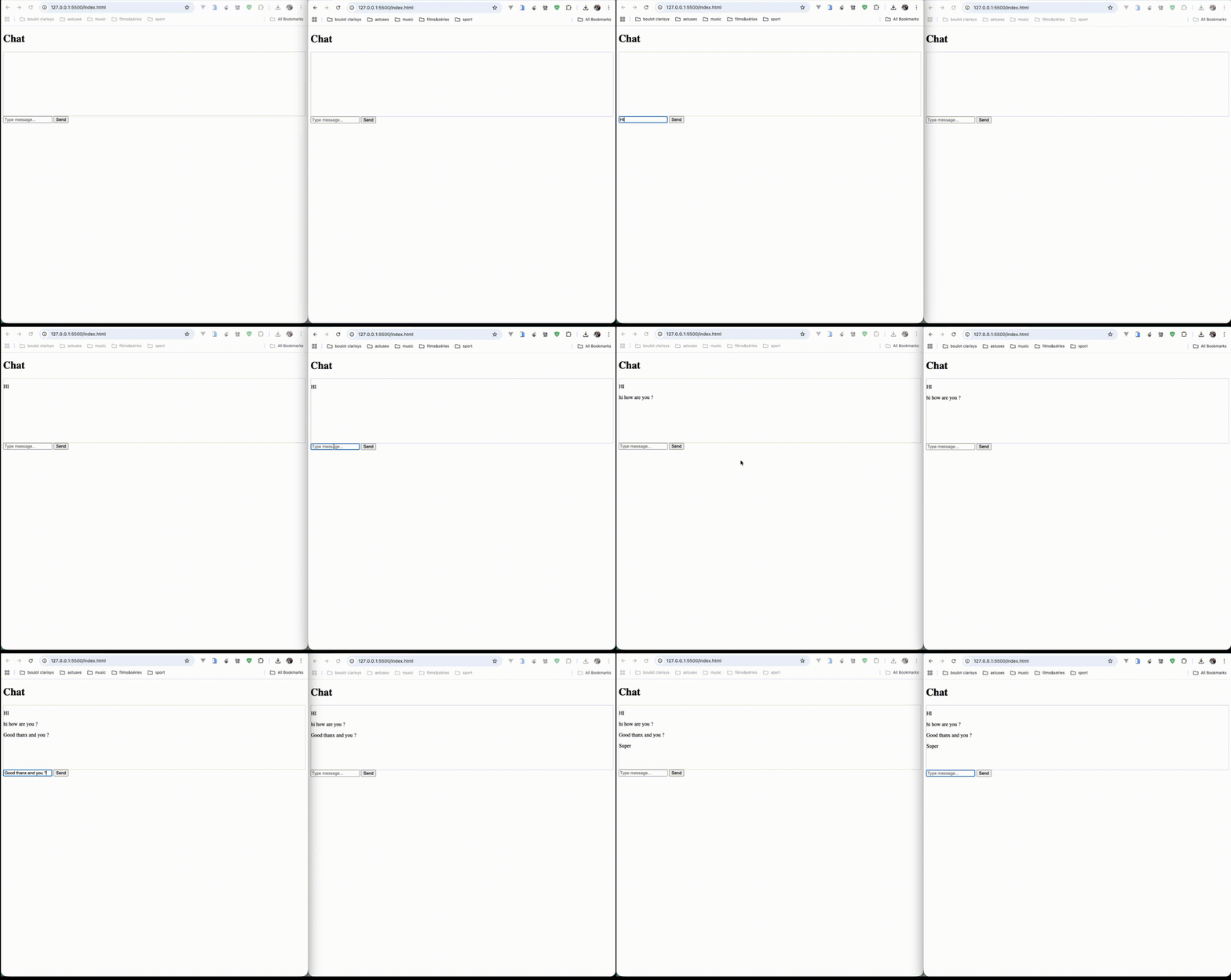
go run main.goOpen the html page with your browser twice to coonect to th SSE server
Result Overview
Github repository
Real Time Chat System With Golang, Redis and Server Side Events
Final Words
In this walkthrough, we’ve seen how surprisingly straightforward it is to build a real-time, server-to-client chat system using nothing more than Go’s standard library, HTTP, and Redis Pub/Sub. By combining a simple POST endpoint for publishing messages with a Server-Sent Events (SSE) stream for delivery, you can achieve continuous, low-latency updates without introducing the complexity of WebSockets or external frameworks.
This approach offers several key advantages: the Go server cleanly handles both publishing (via /send) and broadcasting (via /events), Redis provides a lightweight yet powerful message bus for decoupling senders and receivers, and the entire architecture scales naturally across multiple instances.
However, as with any real-time system, attention to detail matters. You’ll need to handle connection lifetimes, buffering, error recovery, reconnections, and client cleanup to ensure reliability under load. And while Redis Pub/Sub works perfectly for ephemeral, transient messaging, you may want to explore Redis Streams or more robust brokers (like NATS or Kafka) when you need persistence, message replay, or delivery guarantees.
Ultimately, this example demonstrates how you can use standard Go features and minimal infrastructure to achieve a production-ready foundation for live updates, notifications, or collaborative features — simple, efficient, and scalable by design.