Building an HTTP PDF Generation Service in Go Using HTML Templates and WeasyPrint

Introduction
PDF generation is a common backend requirement for invoices, receipts, reports, and legal documents. In Go, while the standard library does not render PDFs directly, it provides excellent primitives to build a clean HTTP service that generates PDFs by delegating rendering to a specialized engine.
In this article, we will build a HTTP service that returns a PDF response, generated from HTML templates, styled with external CSS and fonts, and rendered using WeasyPrint.
The result is a production-grade architecture that is easy to maintain, test, and extend.
Install Weasyprint
You can refer to Weasyprint Installation Documentation and follow the steps to install the package on your system, however, the easiest way to install WeasyPrint on macOS is to use Homebrew:
brew install weasyprintProject Structure
goweasyprint/
├── assets
│   ├── css
│   │   └── invoice.css
│   ├── fonts
│   │   └── Inter-Regular.ttf
│   └── images
│       └── logo.webp
├── cmd
│   └── main.go
├── go.mod
└── templates
    └── invoice.html
This structure keeps presentation assets clearly separated from application logic.
Domain Model: Invoice Data
We start with a well-defined model. This keeps business logic out of templates.
type Company struct {
	Name    string
	Address string
	LogoURL string
}

type Item struct {
	Description string
	Quantity    int
	UnitPrice   float64
}

func (i Item) Total() float64 {
	return float64(i.Quantity) * i.UnitPrice
}

type Invoice struct {
	Number    string
	Date      string
	Company   Company
	Customer  string
	Items     []Item
}

func (i Invoice) GrandTotal() float64 {
	total := 0.0
	for _, item := range i.Items {
		total += item.Total()
	}
	return total
}
HTML Template File
This template is print-optimized and includes pagination, headers, and footers.
<!DOCTYPE html>
<html>
<head>
    <meta charset="UTF-8">
    <title>Invoice {{.Number}}</title>
    <link rel="stylesheet" href="css/invoice.css">
</head>
<body>

<header class="header">
    <img src="images/logo.webp" class="logo">
    <div>
        <h1>Invoice</h1>
        <p>#{{.Number}}</p>
        <p>Date: {{.Date}}</p>
    </div>
</header>

<section>
    <strong>{{.Company.Name}}</strong><br>
    {{.Company.Address}}
</section>

<section class="customer">
    <strong>Billed To:</strong><br>
    {{.Customer}}
</section>

<table class="items">
    <thead>
        <tr>
            <th>Description</th>
            <th>Qty</th>
            <th>Unit</th>
            <th>Total</th>
        </tr>
    </thead>
    <tbody>
    {{range .Items}}
        <tr>
            <td>{{.Description}}</td>
            <td>{{.Quantity}}</td>
            <td>{{printf "%.2f" .UnitPrice}}</td>
            <td>{{printf "%.2f" .Total}}</td>
        </tr>
    {{end}}
    </tbody>
</table>

<section class="total">
    <strong>Grand Total:</strong>
    {{printf "%.2f" .GrandTotal}}
</section>

</body>
</html>
Styling and Fonts
@font-face {
    font-family: "Inter";
    src: url("fonts/Inter-Regular.ttf");
}

body {
    font-family: "Inter";
    margin: 40px;
    color: #333;
}

.header {
    display: flex;
    justify-content: space-between;
    margin-bottom: 30px;
}

.logo {
    height: 100px;
}

.items {
    width: 100%;
    border-collapse: collapse;
    margin-top: 20px;
}

.items th, .items td {
    border: 1px solid #ddd;
    padding: 8px;
}

.total {
    margin-top: 20px;
    text-align: right;
    font-size: 18px;
}
Rendering HTML into a Buffer
We render the template directly into memory.
func renderHTML(invoice Invoice) (*bytes.Buffer, error) {
	tmpl, err := template.ParseFiles("templates/invoice.html")
	if err != nil {
		return nil, err
	}

	var buf bytes.Buffer
	if err := tmpl.Execute(&buf, invoice); err != nil {
		return nil, err
	}

	return &buf, nil
}
Converting HTML to PDF
func htmlToPDF(html *bytes.Buffer) ([]byte, error) {
	cmd := exec.Command(
		"weasyprint",
		"-",
		"-",
		"--base-url",
		"assets",
	)

	cmd.Stdin = html

	var pdf bytes.Buffer
	cmd.Stdout = &pdf

	var stderr bytes.Buffer
	cmd.Stderr = &stderr

	if err := cmd.Run(); err != nil {
		return nil, fmt.Errorf("weasyprint error: %s", stderr.String())
	}

	return pdf.Bytes(), nil
}-tells WeasyPrint to read HTML from stdin-tells it to write PDF to stdout--base-urlassets resolves:- css/invoice.css
- fonts/*.ttf
- images/logo.png
HTTP Handler: Streaming the PDF
func invoiceHandler(w http.ResponseWriter, r *http.Request) {
	invoice := Invoice{
		Number: "INV-2026-001",
		Date:   time.Now().Format("2006-01-02"),
		Company: Company{
			Name:    "Acme Corp",
			Address: "123 Business Rd, Tech City",
		},
		Customer: "John Doe",
		Items: []Item{
			{"Consulting Services", 8, 75},
			{"Cloud Hosting", 1, 120},
		},
	}

	htmlBuf, err := renderHTML(invoice)
	if err != nil {
		http.Error(w, err.Error(), http.StatusInternalServerError)
		return
	}

	pdfBytes, err := htmlToPDF(htmlBuf)
	if err != nil {
		http.Error(w, err.Error(), http.StatusInternalServerError)
		return
	}

	w.Header().Set("Content-Type", "application/pdf")
	w.Header().Set("Content-Disposition", "inline; filename=invoice.pdf")
	w.WriteHeader(http.StatusOK)
	w.Write(pdfBytes)
}
Server Entry Point
func main() {
	http.HandleFunc("/invoice", invoiceHandler)

	log.Println("PDF service listening on :8080")
	log.Fatal(http.ListenAndServe(":8080", nil))
}
Then run ther serve
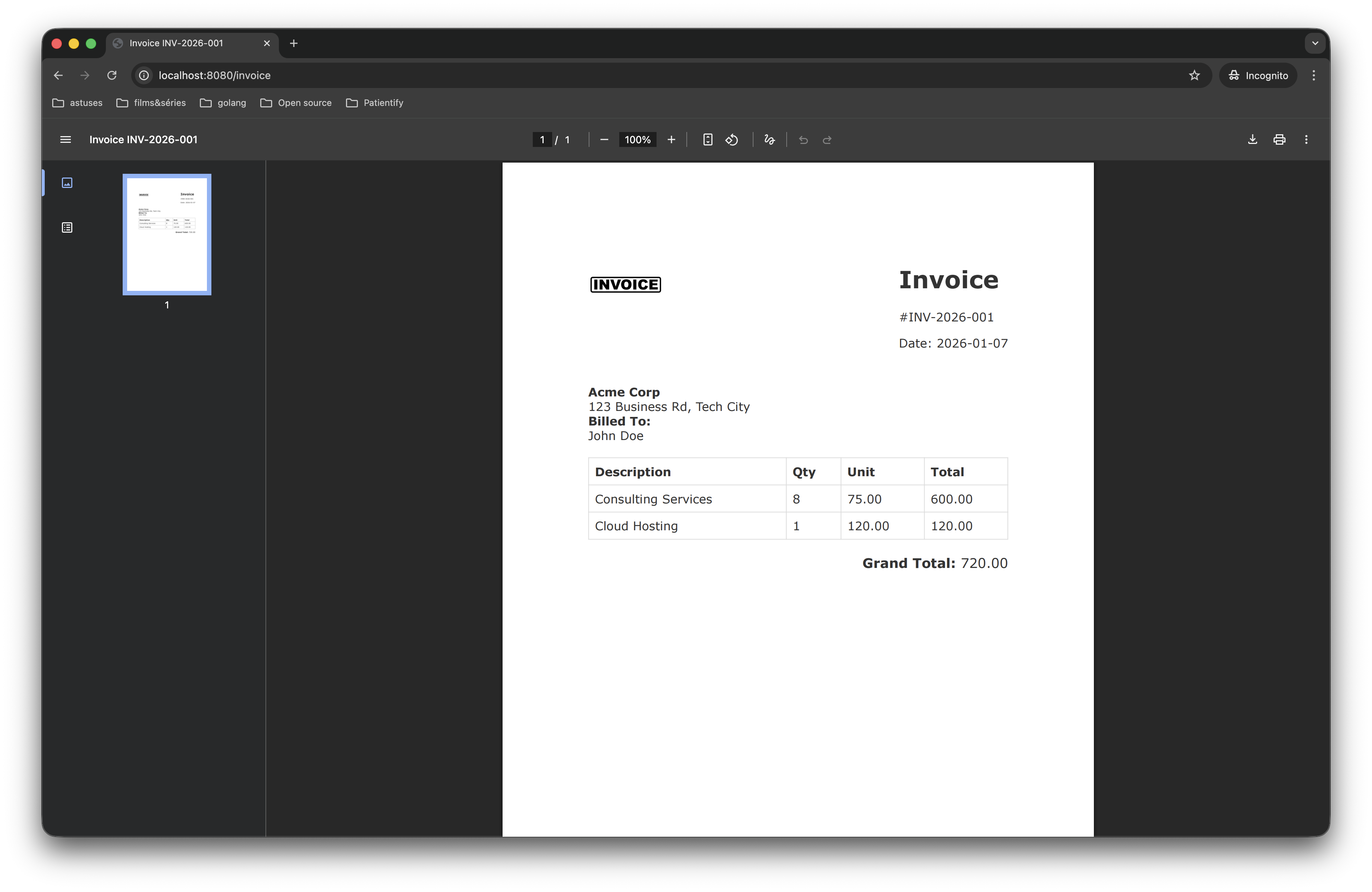
go run ./cmd/main/goOpen http://localhost:8080/invoice with your browser
Result
Github
You can find the Source Code Here
Conclusion
By combining Go’s standard library with HTML templates and WeasyPrint, this architecture delivers a robust and idiomatic solution for generating PDFs from HTML in Go. The service is fully stateless, operates entirely in memory without relying on temporary files, and cleanly separates data, presentation, and rendering concerns through template-driven design and the use of a dedicated rendering engine. Because Go acts purely as an orchestrator and does not depend on renderer-specific logic, the approach remains flexible and renderer-agnostic. As a result, it scales naturally under load, integrates seamlessly into containerized and cloud-native deployments, and fits perfectly within modern microservice architectures where performance, simplicity, and maintainability are critical.